
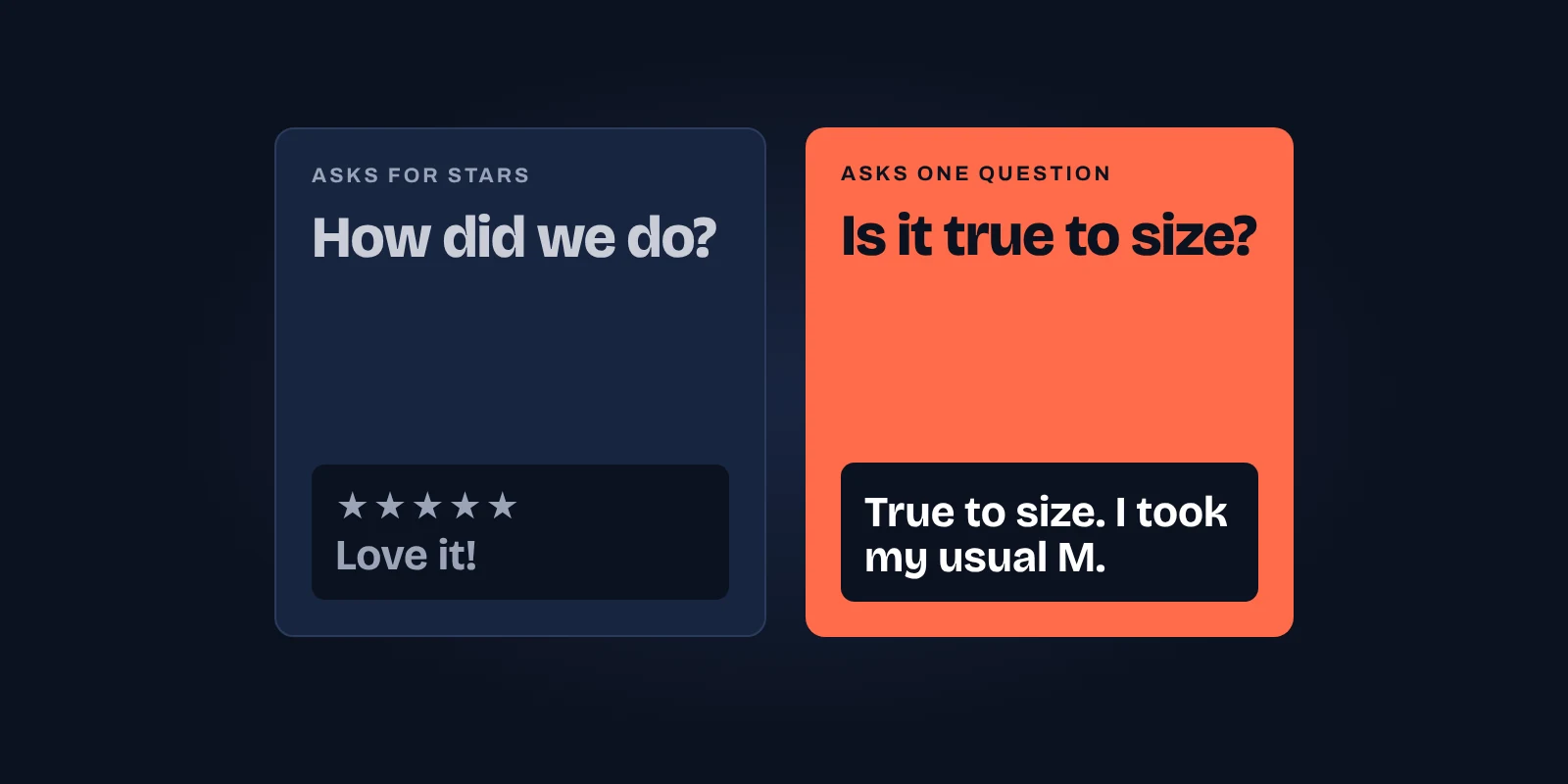
The same email keeps landing in your inbox: is it true to size? Your customers know, and your review request never asks them. Ask, and the next shopper reads the answer on the product page.
Advice on how to ask customers for reviews often says to catch them when they’re happiest. From there it’s a short step to asking only the customers who seem pleased, or rewarding the five-star reviews. You can, but you shouldn’t: the FTC warns against both, and reviews picked that way tell the next shopper nothing new. Ask for a useful review instead. Send the request to every buyer once they’ve used the product, and ask the question shoppers keep emailing you.
How to ask customers for reviews: every buyer, once they’ve used it
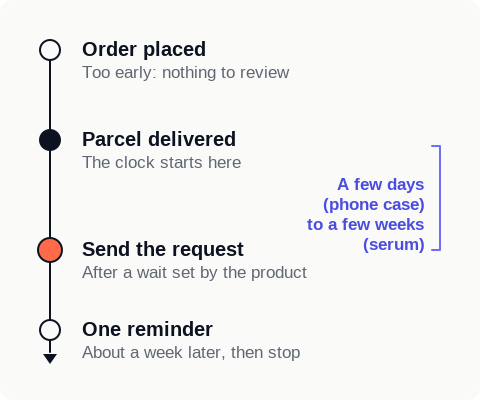
Ask after the parcel arrives and the customer has had time with the product, not when they place the order. A customer can’t tell you whether a jacket is true to size until they’ve worn it, so a request that lands before the parcel gets a rating of your checkout instead. Set the wait by how long the product takes to show what it’s like: a few days for a phone case, a few weeks for a serum. Then send one reminder about a week later to anyone who hasn’t answered, and stop there.
Ask every buyer, including the ones you suspect weren’t thrilled. The customer who swapped to another size is the one who can tell other shoppers which size to order, and that’s worth more than another “Love it!”. A setup that asks “Happy with your order?” first and sends only the yeses on to the review form loses that customer, so leave it off.
How to get customer reviews on Shopify: choose who sends the request
Who sends the request decides what it can ask and where the answer ends up. Start with Shopify’s own Shop reviews, because it needs no reviews app. Once you switch on its review collection, it asks your online-store buyers for a review through a Shop app notification after their order is delivered. That’s enough when your product page already answers what shoppers ask, as it does for a refill they’ve bought before. Shop asks for one to five stars and an optional comment, though, so it can’t put your question to them. The reviews appear in the Shop app, and from there they’re shared with supported reviews apps, where you choose whether to publish them on your store.
When shoppers keep emailing you the same question, send your own request through a reviews app. Its email can carry your question and put the answers on your product page. Shop’s request can then be your one reminder. Set its wait about a week longer than the app’s, and turn off the app’s own reminder, so no buyer is asked more than twice. If Shop supports your reviews app, turn on syncing between the two as well. Shop then skips buyers who have already reviewed, so the reminder goes only to those who haven’t. Shopify Messaging looks like another route, but its marketing automations go only to subscribers by default, so it misses everyone who bought without signing up.
For a new or small store, a personal email from your own address does the job well. It reads as a note from a person, and you can ask the question in your own words. Each one takes your time, so it stops working once orders outgrow the hours you have. A card in the parcel or a note on the order confirmation page arrives before the customer has used the product, so neither can be the request. A card can still tell them a short email is on its way and what it will ask, which gets them thinking about the question while they use the product.
Pick the reviews app for the request it lets you send. It has to let you write your own question in place of its stock wording, and time the email from delivery rather than the order date. It should also let customers add a photo from their phone.
Review request email: one question and one link
A request that asks “How did we do?” above five empty stars gets a rating and two words back. Ask the question your product page leaves open instead, the one shoppers email you before they buy. For clothing it’s fit, and for a laptop bag it’s whether a 15-inch laptop fits. Write that question into the email itself, so the answer lands in the review, where shoppers read it before they buy. Ask for a photo of the product in use too, because a picture shows what words can’t.
Your customers know whether it’s true to size. The request only has to ask.
Here’s wording to start from. Swap the fit question for your own:
Subject: Is your {product} true to size?

Hi {first name},

You've had your {product} for a few days. Is it true to size?
Tell us which size you ordered and how it fits.

Your answer helps the next person choose their size, and a photo of
you wearing it helps them most.

[Write a review]

Thanks,
{your name} at {store name}
Keep the email to that one question and one link. Leave out discounts, new arrivals and “you might also like”, so it reads as a note to someone who bought from you. Once a request carries an offer, it becomes a marketing email. Send those only to people who signed up, while your request has to reach every buyer. Offer nothing for the review itself either, because a discount makes the reviews it brings in look bought.
On a coaching call we go through your request, how you send it and where your reviews sit on the product page.
On the product page: put the answers where the shopper decides
Put the average rating and the number of ratings under the product title, linked to the reviews further down, so a shopper sees both before they scroll. Shoppers weigh how many ratings there are as well as the average. Asked to choose between two products, more people picked the slightly lower average with more ratings behind it:
| 4.5 stars | 5 stars | Picked the 4.5 stars |
|---|---|---|
| 12 ratings | 2 ratings | 56% |
| 57 ratings | 4 ratings | 62% |
For your theme’s own stars to show under the title, your reviews app needs to fill Shopify’s standard rating fields, the ones Shopify tells themes to read for product ratings. If the app’s reviews widget grows as it loads, ask your theme developer to reserve its height. Otherwise it pushes the page down, and a shopper about to tap hits the wrong thing.
Publish every rating, and keep the low ones in the same list as the rest. If your reviews app can hold low ratings back, leave that setting off. A wall of five stars looks picked: some shoppers doubt small brands whose ratings are consistently high, and wonder whether only the good reviews were kept. An honest three-star review that says which size the customer swapped to also helps a shopper choosing between two sizes.
Then move the answer up to where the shopper decides. When reviews keep saying the same thing about fit, say it in a fit line beside the sizes, rather than leaving the shopper to find it in review twelve. The same goes for a spec: if reviewers keep saying which laptops fit the bag, put that in the specs.
Read your reviews like an audit
Once a month, read what customers wrote that month and list the questions and complaints that repeat. Start with the low ratings, because they name what the product page promised and the product didn’t deliver. When the same point comes up three times, it’s a gap on the product page, and the fix is a line, a photo or a spec. For example, if three customers ask how long the strap is, put its length in the specs and add a photo of the bag being worn.
Then reply under each of those reviews with what you changed. The customer sees they were heard, and anyone reading later sees the point was dealt with rather than ignored.
A new store with no reviews yet: answer the questions yourself
Until customers start writing, the product page has to answer the questions their reviews would. Put your delivery times, your returns policy and a way to contact you on the product page, rather than only in the footer. If your reviews app shows an empty “No reviews yet” box, hide it until the first ones are in.
Meanwhile, the personal email is your request: write to each of your first buyers and ask them your question. That’s slow, and a new store is tempted to fill the gap with friends and staff instead. Don’t ask them to, because a shopper reads every review on the page as a customer’s. Any review a friend or member of staff does write should say how they know you.
How to measure a review request: reviews per 100 delivered orders, and answers to your question
Each month, count new reviews against the orders delivered that month, as reviews per 100 delivered orders. More orders bring more reviews even when the request hasn’t changed, so the rate per 100 shows whether the request itself got better. If reviews per 100 delivered orders fall after you change the wait or the wording, change it back.
Then count how many of those reviews answer your question. They’re the ones doing the work on your product page. If few of them do, put the question higher in the email and make it plainer.
Checklist
- The request goes to every buyer, starts from delivery, waits as long as the product needs and sends one reminder
- Your reviews app sends the request with your question, and if you run Shop’s request too, it goes out about a week later as the one reminder
- The email asks the one question your product page leaves open, and for a photo, with no offer in it
- Every rating is published, and the average rating and number of ratings sit under the product title
- Any question or complaint that comes up three times in a month becomes a fix on the product page
- Each month you check reviews per 100 delivered orders, and how many answer your question
A CRO audit reads your product pages the way a shopper does on a phone, and ranks the gaps worth closing first.

A collective of ecommerce veterans with 15+ years across marketing, development and UX. We audit stores, coach teams and build tools for Shopify merchants.