
You can rewrite Shopify’s abandoned cart email as often as you like. If a shopper left over your delivery cost, two moments decide what the email can do. The wording isn’t one of them.
The first is when they see the cost: at checkout, after they type an address. Until then, the cart in Shopify’s own theme demos says little more than “Taxes and shipping calculated at checkout.”
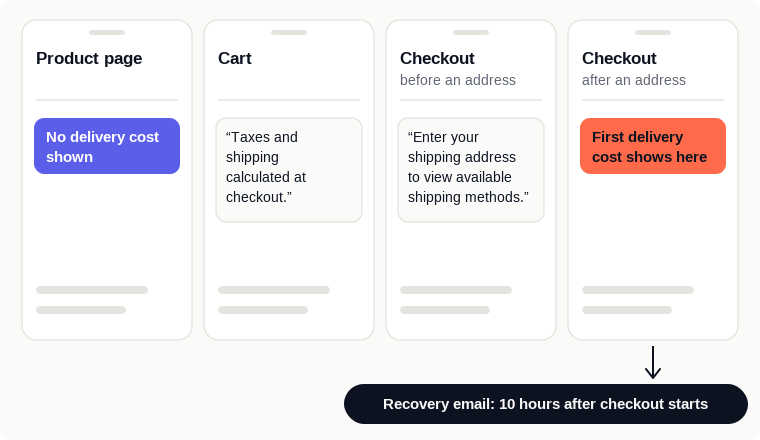
The second is when the email lands. In Shopify Messaging, the Recover abandoned checkout template says it sends 10 hours after a shopper goes to checkout.
By then, the shopper has seen the cost and said no. Your cart and product page can tell shoppers about delivery before checkout does. The email can only send them back to the same price, unless it carries a discount paid from your margin.
On Shopify’s demo stores, the delivery cost first shows at checkout
On Shopify’s Dawn and Horizon demo stores, a shopper sees no delivery cost until they type an address at checkout. We checked them on a phone in October 2026, on Horizon 3.2.0 and Dawn 15.0.0 (older than the versions the Theme Store listed on 14 October 2026):
- Product page: no delivery cost on either theme (Dawn’s demo has a free-shipping banner, but that’s merchant text, not the theme’s).
- Cart: Dawn says “Taxes, discounts and shipping calculated at checkout.” Horizon’s cart drawer and page say “Taxes and shipping calculated at checkout.”
- Checkout, before an address: under Shipping method, both stores’ checkouts say “Enter your shipping address to view available shipping methods.”
Shopify’s rule is the same: no shipping rates until the shopper enters a delivery address.
Accelerated checkout buttons, like Buy with Shop on a product page, let shoppers go straight to checkout and skip the cart. For those shoppers, the product page is the only screen before checkout that can mention delivery.
What a recovery email can change after checkout, and what your cart can change before
Shopify’s help says the abandoned checkout automation can include a discount, which you set in Shopify Messaging. It comes out of your margin.
Without a discount, a recovery email can only send the shopper back to a price they’ve already seen.
Your cart reaches shoppers the email never does. For example, in the store worked through below, 600 of 1,000 carts never reach checkout. Of the 880 shoppers who leave, only 60 get the email.
Your cart can also tell shoppers what delivery costs before checkout does. That line is the lever. If your rate offers free delivery over a minimum, put the minimum in it too, because Shopify shows no shipping rate until an address is entered (see the order amount section below).
Change the first screen that shows the delivery cost
- On your phone, open a product, add it to the cart and check out. Write down what the product page, the cart and checkout say about delivery before you type an address.
- In Settings > Shipping and delivery, open your shipping profile and note your rate type for your main shipping zone.
- Decide what the first screen should say for that rate type, using “What the first screen can say, by rate type” below.
- To change the cart line, duplicate your live theme just before you edit: in Online Store, open the theme’s actions menu and choose Duplicate (Shopify allows 20 themes). Leave the live theme alone until you publish the copy. Publishing replaces it, so any change made there in the meantime is lost. In the copy, open Edit default theme content, search for the line’s words and edit them. Shopify keeps cart wording under Sections (changing theme wording). Preview the copy on your phone and publish it. Then check the cart, checkout and your apps. Whenever you change a rate, update the cart line and test a checkout on your phone.
- For an Australian store, check any delivery charge that every order pays against the rule that starts on 1 July 2027 (see “For Australian stores” below).
What the first screen can say, by rate type
What your cart can say depends on whether your store knows the delivery cost before it knows the address. Only one of the four rate types needs an app. For the others, change the cart line in Edit default theme content and the rate in Settings > Shipping and delivery. The prices in the examples are placeholders, so use your own currency.
| Rate type | Cost known before an address? | Cart can say | App needed? |
|---|---|---|---|
| Flat rate, within your main zone | Yes | The amount | No |
| Weight, within your main zone | Yes, from basket weight | The weight bands | No |
| Order amount (price-based), free over a minimum | Yes, by basket size | The rate and the minimum | No |
| Carrier-calculated | No | How it’s worked out | For an estimate |
Flat rate, within your main zone
- What you can show: the amount, in the cart and on the product page.
- Example cart line: “Delivery $9.95 Australia-wide.”
- Trade-off: it overcharges small parcels and undercharges heavy ones.
Weight, within your main zone
- What you can show: your weight bands.
- Example cart line: “Delivery $9.95 up to 1 kg, $14.95 up to 5 kg.”
- Trade-off: shoppers must work out basket weight, so it suits a few clear bands.
Order amount (price-based), free over a minimum
- What you can show: the rate and the minimum. Any rate can offer free shipping over a minimum, but shoppers see it at checkout, after they enter an address. So put it in the cart line. If you use an automatic free shipping discount with a minimum, its title shows at checkout. Shopify’s help says it shows in the cart too, so check your theme’s cart. You write the title, so put the minimum in it (“Free delivery over $80”). Taxes never count towards the minimum.
- Example cart line: “Free delivery over $80, $9.95 below that.”
- Trade-off: free delivery over the minimum comes out of your margin, and shoppers below it still pay the rate. Compare average order value and orders over matching whole weeks before and after you set one.
Carrier-calculated
- What you can show: how it’s worked out, because carrier rates depend on the order and destination. Shopify’s Cart theme settings don’t include a shipping estimator. So a Shopify shipping calculator in the cart comes from an app, or from a theme that adds one.
- Example cart line: “Delivery is calculated by weight and postcode at checkout.”
- Trade-off: an app adds a script, and estimates can differ from the final rate.
If you need an app, check that it:
- works with carrier-calculated rates
- needs no theme code edits
- shows in the cart drawer and the cart page
- has a free plan or trial
- asks only for the data it needs
For Australian stores
From 1 July 2027, if a store selling to Australian consumers shows a price, it must also show any extra charge every buyer pays, such as a delivery fee on every order. That charge must be prominent and close to the price. That’s section 48A of the Australian Consumer Law, inserted by Schedule 1 Part 2 of the Competition and Consumer Amendment (Unfair Trading Practices) Act 2026. If the amount can’t be calculated, the Act lets the store show the method for calculating it instead (s 48A(2)). Charges “payable at the option of the purchaser” are excluded (s 48A(8)). This isn’t legal advice, so check how it applies to your store with an adviser.
A CRO audit traces your delivery cost, checkout and recovery email on a real phone, and ranks the fixes.
What Shopify’s abandoned cart email can and can’t reach
Shopify’s abandoned cart email is the Recover abandoned checkout template. It reaches only shoppers who got to checkout and typed an email address.
- Who’s recorded: shoppers who entered an email address and left the checkout unfinished for more than 10 minutes, on Online Store and Buy Button checkouts.
- Who’s missed: shoppers who gave a phone number, left before typing an email or never reached checkout.
- When it sends: in Shopify Messaging, the template says it sends 10 hours after a shopper goes to checkout.
- Discount: Shopify’s help on discounts for abandoned checkout emails says the automation can include a discount. The default template shows no discount option.
- Who it goes to: the To field defaults to email subscribers and can be set to all customers.
For example, here’s a month at one store. The numbers are round, not typical.
- The store has 1,000 sessions that add something to the cart.
- Of those, 400 reach checkout. The other 600 never see it.
- Of the 400, 120 complete checkout and 280 leave.
- Of the 280 who leave, 160 typed an email first. Shopify records each one as an abandoned checkout once it has been left for 10 minutes, so that’s 160 abandoned checkouts. The other 120 left before typing an email, or gave a phone number.
- To is set to subscribers only by default. Say 60 of the 160 are subscribed, so they get the email.
In this example, 60 emails go out for the 880 shoppers who left (600 at the cart, 280 at checkout).
Set To to all customers and 160 of the 880 get it, if your consent rules let you email shoppers who didn’t subscribe. Shopify’s Recover abandoned cart template says it messages customers who added to cart but haven’t proceeded to checkout. Shopify doesn’t document how it identifies them, so the example leaves it out.
Shopify’s help explains how to switch the automation on. Once you opt in, you can’t undo it.
How do you tell whether a new cart line helped?
A cart line that works can make one step of your funnel look worse.
In Conversion rate breakdown, compare three of its four steps: Added to cart, Reached checkout and Completed checkout. Use whole weeks before and after the change. Both periods must fall after Shopify’s change to how it counts sessions, rolled out between 21 and 23 September 2026 (Shopify’s session measurement update).
Reached checkout can fall. A shopper who sees the cost in the cart and says no leaves there, not at checkout. Take the 1,000 carts from the example store above. Say that after the change, only the drop-off moves:
| Step | Before | After |
|---|---|---|
| Added to cart | 1,000 | 1,000 |
| Reached checkout | 400 (40%) | 330 (33%) |
| Completed checkout | 120 (30%) | 120 (about 36%) |
We worked out each percentage as the step over the one before. Shopify’s report divides every step by total sessions instead. Orders stayed the same. Judge the change by Completed checkout and orders, not by one step.
Orders > Abandoned checkouts can fall too, once shoppers decide in the cart. That isn’t the email working better. Count it from 16 June 2026, when Shopify stopped creating abandoned checkouts for bot sessions that don’t complete payment.
Shopify’s Rollouts can A/B test your current cart against one that shows the cost.
Checklist
- The first screen that shows a delivery cost, checked on your own phone
- Your rate type for your main shipping zone, noted
- A cart line that says something true and specific about delivery, including any free-delivery minimum
- Any delivery charge every order pays shown with the price (Australian stores, from 1 July 2027)
- The To field on Recover abandoned checkout checked, so you know who it can reach
- Completed checkouts compared over matching weeks, both after Shopify changed how it counts sessions (rolled out between 21 and 23 September 2026)
A CRO audit follows a shopper through every screen on the phones your customers use, and ranks what to change first.

A collective of ecommerce veterans with 15+ years across marketing, development and UX. We audit stores, coach teams and build tools for Shopify merchants.