
A shopper who buys your two best sellers together already pays for one parcel. Bundle them at 15% off and the whole 15% comes out of your margin.
You pay to pack and send that order either way, so the bundle saves you nothing. The discount comes out of what the order leaves you.
What the shopper would have bought without the bundle decides how deep its discount can go. Set the discount from that, not from a percentage that sounds generous.
One example with round numbers runs through this post. Your two best sellers are a $40 face serum and a $20 cleanser, and you want to bundle them for under $60.
Bundle pricing examples: a set, a multipack or a mix and match
Bundle pricing sells two or more items together, usually for less than their full price: their normal prices added together. For the serum and cleanser, the full price is $60. Bundles come in three kinds:
- A fixed set: the same items every time, such as your serum and cleanser sold as one skincare set.
- A multipack: several of one item sold together, such as a three-pack of your cleanser.
- A mix and match: the shopper picks, such as any three products from your skincare range.
A fixed set or a multipack is usually a bundle product, a listing with its own page and price. Or you can run the offer as a product discount: money off products you already sell once the cart holds the right ones.
How much to discount a bundle: no more than it adds or saves you
A bundle’s discount comes out of what each order leaves you: the sale, less what the items cost you to buy or make, less sending and payment fees. In this example, the fees are the same for every order, whatever it holds.
| Item | What it costs you | Normal price |
|---|---|---|
| Face serum | $16 | $40 |
| Cleanser | $8 | $20 |
| Both | $24 | $60 (full price) |
| Sending and payment fees | Each order |
|---|---|
| Shipping and packing | $8 |
| Fixed payment fee | $2 |
| Total | $10 |
Take each off the sale to see what an order leaves you:
| Serum on its own | Cleanser on its own | Both in one order | |
|---|---|---|---|
| Sale | $40 | $20 | $60 |
| Less what the items cost you | −$16 | −$8 | −$24 |
| Less sending and payment fees | −$10 | −$10 | −$10 |
| Leaves you | $14 | $2 | $26 |
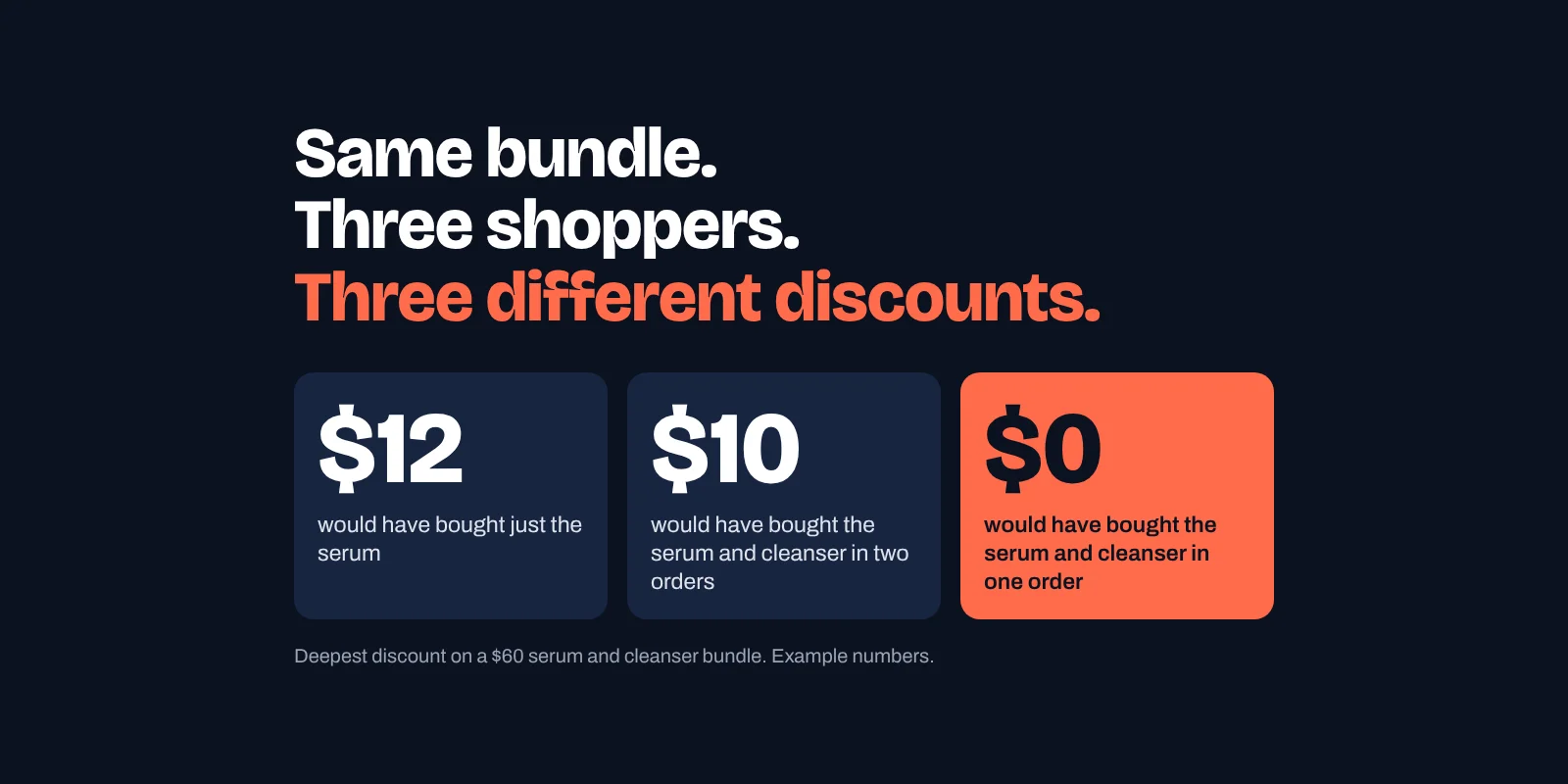
Three shoppers buy your bundle. Without it, one would have bought just the serum. One would have bought both in two orders, which leave you $14 and $2, the first two columns of the table. The third would have bought both in one order.
At full price, the bundle is one order of both, so it leaves you $26. Its deepest discount, the most it can give away, is the gap between that $26 and what the shopper’s order would have left you:
- The shopper who’d have bought just the serum ($14). The bundle adds the cleanser to an order you’d have had anyway, so it leaves you $12 more. That $12 is its deepest discount.
- The shopper who’d have bought both in two orders ($16). The bundle changes what they buy from two orders to one, so you pay the fees once. The $10 it saves is the deepest discount.
- The shopper who’d have bought both in one order ($26). The bundle adds nothing and saves nothing. Every dollar off comes out of the $26.
Put 15% off the bundle and it gives away $9. That’s within the deepest discount for the first two shoppers. From the third, you take $9 less for an order you’d have had anyway.
A bundle can give away what it adds or saves you, and no more.
Work out the deepest discount with your own numbers
The contribution margin calculator runs the same sums with your own items. It calls what an order leaves you Contribution per order. Start with the shopper who’d have bought both in two orders.
- Open each item in the bundle. Go to Products and open the serum, then the cleanser. Each one’s cost sits in its Pricing section.
- Fill in any empty cost. If Cost per item is empty for the variant you’ll bundle, enter what you pay to buy or make it, and click Save. Shopify’s profit reports leave out anything sold without one. In the example, that’s $16 for the serum and $8 for the cleanser.
- Add up your sending and payment fees. Take what shipping and packing cost you per order, less what shoppers pay you for shipping. Then note both parts of your payment provider’s fee: the percentage of each sale and any fixed fee per order. In the example, shipping and packing come to $8, and the payment fee is a fixed $2 with no percentage.
- Enter the bundle at full price. In the calculator, enter the full price as Average order value ($60) and what both items cost you as Product cost per order ($24).
- Enter your fees. Fill in Shipping and packing ($8), Payment fee rate (0% in the example, which has no percentage fee) and Fixed payment fee ($2).
- Set Ad spend per order to 0. That way you compare orders before ads. Contribution per order shows $26 for the example bundle.
- Enter the serum on its own. It’s the first of the two orders this shopper would have placed without the bundle. Change Average order value to $40 and Product cost per order to $16. Contribution per order shows $14.
- Enter the cleanser on its own. That’s their second order. Change the two figures to $20 and $8, and note the result: $2. Add the two results together. In the example, the two orders leave you $16, as in the table above.
- Bring the bundle’s price down until it matches. Go back to the bundle’s figures. Lower Average order value until Contribution per order equals the shopper’s result. At $50, the example bundle leaves you $16.
- Read off your deepest discount. It’s the full price less the price from step 9: $10 in the example.
- Repeat for the shopper who’d have bought just the serum. Enter only the serum’s order in step 7 and skip step 8. The example bundle can come down to $48 for this shopper, a deepest discount of $12.
- For a product discount, repeat for each set of products that qualifies. Run the steps for every set of products a shopper could put in the cart to get the offer.
Done
When shoppers already buy both, don’t discount the bundle
Before you discount, count how often shoppers already buy both items in one order. In Orders, filter by Product and Date to see the serum’s orders from recent months, and count those that hold the cleanser too.
What a $50 bundle sale is worth depends on what that shopper would have bought without it:
| Who buys the $50 bundle | Their order leaves you | To cover one order you’d have had anyway |
|---|---|---|
| Someone who’d have bought just the serum | $2 more | 5 of them |
| Someone who’d have bought just the cleanser | $14 more | 1 |
| Someone who’d have bought both, in two orders | No change | None can |
| Someone who’d have bought both, in one order | $10 less | This is that order |
If the bundle can’t win about five shoppers who’d have bought just the serum for every order you’d have had anyway, don’t take $10 off. Sell the set at $60, for convenience, or pair the serum with another best seller: one your serum buyers want but don’t usually put in the same order.
If the items are too new to count, start with a few dollars off, not the full $10. Go deeper only once measuring shows the bundle paid.
Building the bundle: each kind takes a different tool
Pick the tool for how you’ll sell the serum and cleanser:
| What you’re selling | How to build it |
|---|---|
| The serum and cleanser as one $50 product | Shopify Bundles |
| $10 off the cleanser when the serum is in the cart | A product discount, in Discounts |
| Any three from your skincare range, picked by the shopper | A bundle app |
Shopify Bundles: for a set or a multipack
Shopify Bundles is Shopify’s own app for building a bundle product from items you sell. When we tested, it priced the bundle at full price. Change that to $50.
A bundle product sells out once one of its items runs too low for another bundle. When you reorder the cleanser, count its bundle sales too.
A product discount: Buy X get Y or Amount off products
A product discount can be an automatic discount, which applies once the cart qualifies, or a code. You set up both in Discounts. Two types fit a bundle:
- Buy X get Y puts the saving on particular items. For the example, the shopper buys the serum and gets $10 off the cleanser.
- Amount off products, with a minimum quantity of items, runs an offer such as “buy any three, save 10%”. If you limit it to some products, only those count toward the three.
When we tested an automatic discount of 10% off two of the same product, the saving first showed on the cart page, not the product page. Show the offer on the product page yourself.
A bundle app: for a mix and match
Shopify Bundles doesn’t build a mix and match. That takes a bundle app, or on Shopify Plus, a developer. Choose an app that records what the bundle costs you and handles stock.
Discount codes on top: check what lands on the bundle
A discount code can take more off the bundle’s price. The $50 bundle is already at its deepest discount against two orders. Add a 10% order code and it leaves you $11, less than an order of just the serum:
- Bundle price: $50
- Less the 10% code: −$5
- Less what the items cost you: −$24
- Less sending and payment fees: −$10
- Leaves you: $11
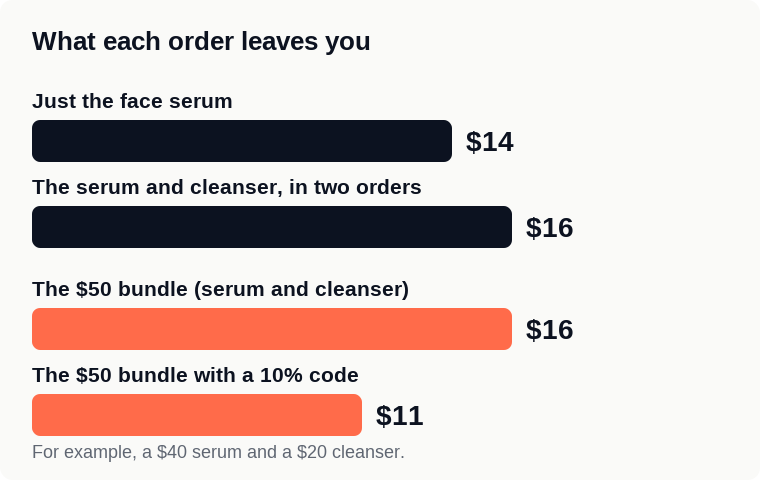
A bundle product’s lower price is its price, not a discount, so it has no Combinations section. When we tested on the Basic plan, a 10% order code came off the bundle’s price.
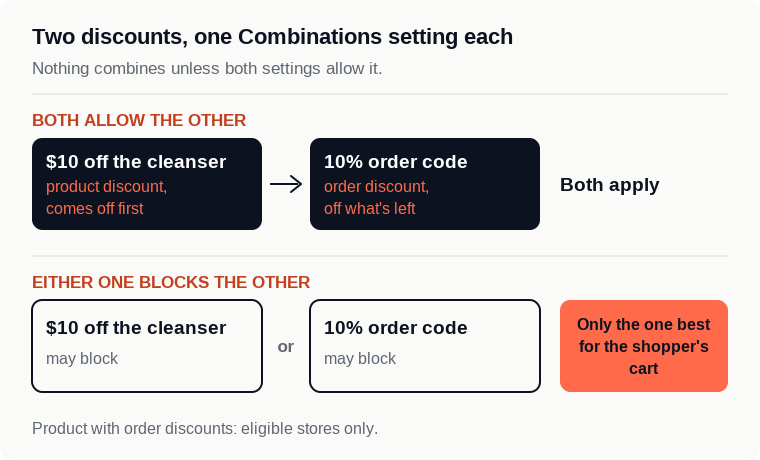
A product discount, such as $10 off the cleanser, does have a Combinations section. A 10% code is an order discount: money off the whole order. No two discounts combine automatically. Two discounts apply together only when each one’s Combinations section allows the other’s kind.
When they combine, the product discount comes off first and the order discount comes off what’s left. When they can’t, the shopper gets whichever one is best for their cart.
- Put the bundle in the cart. Add the bundle product, or the serum and cleanser for a product discount, so you see what a shopper would pay.
- Enter one code at checkout. Go to checkout, enter a code you’ll run while you sell the bundle, and read how much comes off. You don’t need to pay.
- Repeat for every code. Try each one on its own, so you know which take the bundle past its deepest discount. For a bundle product, decide whether to run those codes while you sell the bundle.
- For a product discount, open its Combinations section. Go to Discounts, open the discount and find Combinations.
- Turn off the kind that takes too much. In the example, a 10% order code takes the $10 offer past its deepest discount, so turn off order discounts and click Save.
Done
Our post on which job your discount codes are doing helps you choose which to let through.
Show what’s in the bundle and what the shopper saves
List what’s in the bundle on its product page, where the shopper decides whether it’s worth it: one face serum and one cleanser. Show the saving there too: $10 off the full price. If you show a “worth” figure, make it that full price: $60.
For a product discount, put the offer and its terms on the page of every product it covers: here, “$10 off the cleanser when you buy the serum” on both pages. Show the code too, if it needs one, so shoppers know their price before they add to cart. In the US, the FTC’s Guides Against Deceptive Pricing say an offer that depends on buying more should make its terms clear from the start.
Keep the serum at $40 and the cleanser at $20 when the bundle launches. If you raise them to make the saving look bigger, shoppers believe in a saving they aren’t getting. The same FTC guides say raising the price of what the shopper must buy to get the offer can mislead.
A CRO audit checks what shoppers see of your offers on the product page, cart and checkout, and ranks the fixes.
Measuring a bundle: orders of both, before and after launch
Measuring a bundle starts in Orders, with the month before launch. Count the orders that held both items, and the customers who bought the two in separate orders.
After launch, pick a month without a launch email or extra ads, which lift sales by themselves. To roughly count bundle orders, divide the bundle’s sales in Shopify’s Bundles report by its price. Add the orders that hold both items without the bundle. A bundle order lists the serum and cleanser as its items, marked as part of the bundle, so leave those out. The rise over the month before is what the bundle added.
At $50, read the rise against your counts:
- Orders you’d have had anyway: the orders of both before launch, less those that still hold both without the bundle. Each leaves you $10 less.
- Customers who bought in separate orders: their two orders leave you the same as a bundle, so take them off the rise.
The bundle paid if what’s left is at least five for every order you’d have had anyway. If not, take less off or change what’s in it.
With your own figures, redo the sums in the calculator. A smaller discount costs less than $10 on each order you’d have had anyway, and a customer who’d have bought in two orders leaves you more with the bundle.
The Bundles report doesn’t cover a product discount. For $10 off the cleanser, Rollouts can show the offer to part of your traffic and your current offers to the rest, then compare how many in each group buy. It needs the Grow plan or higher and doesn’t report a discount’s revenue, so check each version in the calculator too.
Checklist
- Your own two best sellers run through the three shoppers in the contribution margin calculator, with Cost per item set on both
- The deepest discount against each shopper written down: $12, $10 and nothing in the example
- The orders that already hold both items counted, and the sums redone at your own price: at $50, the bundle must win five shoppers for every order you’d have had anyway
- Every code you’ll run tried at checkout with the bundle, and a product discount’s Combinations section set
- The contents and saving on the bundle’s product page, and a product discount’s terms on every product it covers
- Bundle orders, plus orders that still hold both items without the bundle, compared with the month before launch, and the rise checked against your two counts
On a coaching call we work out what your bundle leaves per order against what your shoppers buy now, and set the discount from there.

A collective of ecommerce veterans with 15+ years across marketing, development and UX. We audit stores, coach teams and build tools for Shopify merchants.