
People on ChatGPT’s Free and Go plans can see a labelled ad under one of its answers: your store’s name, a product photo and a link you chose. That spot is what ChatGPT ads sell. You buy it in OpenAI’s Ads Manager, where you set a maximum bid: the most you’ll pay per click or per 1,000 views.
Is that spot worth paying for? With a channel this young and clicks this rare, we’d run a first campaign as a capped test, not a monthly budget. Your profit per order sets the most a click can cost you. Your product page decides how many of those clicks turn into orders, and your Shopify sales tell you whether the ad paid.
Where ads on ChatGPT appear, and who sees them
Your ad can’t buy its way into ChatGPT’s answer. Ads run on systems separate from the model, OpenAI says, and paying doesn’t change ChatGPT’s answers. Your products can reach the answer itself without an ad, through Shopify’s agentic storefronts. Check what ChatGPT shows of your store before you pay, using our guide to agentic storefronts.
What you pay for sits under an answer that might praise a competitor, so your ad has to earn the click by giving the shopper a reason to choose it. Most of the ad is yours to write: a headline, a short description, an image and the landing page, under your business name. Make the image and headline about what the shopper asked for.
Ads are served on ChatGPT’s Free and Go plans. They’re kept away from conversations about personal health, mental health and politics. Testing began in the US on 9 February 2026, and ads are rolling out gradually in select regions.
Once your ad shows, expect most shoppers to pass it by. A Similarweb panel analysis, published with Graphite in September 2026, found ChatGPT ads were clicked in 0.73% of exchanges that showed one in the US and 0.67% in Australia. An exchange is one message and ChatGPT’s reply. The figures run from 30 March to 16 September 2026 and pool all advertisers, most of them not retailers. That’s a click rate, not the ad conversion rate the table below uses. Clicks this rare are why we’d cap that first test.
How ChatGPT picks an ad: the conversation, your page and your bid
Which conversations your ad appears in is ChatGPT’s call. It decides from a few signals, and only some are yours to steer:
- what the conversation is about
- your landing page, headline and description
- the context hints you set
- with personalisation on, the person’s past chats and memory
Context hints describe the conversations you want, but they aren’t exact-match keywords and don’t guarantee your ad is shown. Coming from Google keywords, expect less control. Your page is the signal you do control, and it counts twice. Among the ads that fit, a relevance-weighted, second-price auction picks the winner, so fit counts alongside your bid. Keep each ad about one product, from its headline to the page it opens.
How to advertise on ChatGPT from a Shopify store
Which route you can take depends on where your business is based:
| Route | Who can use it | How it works |
|---|---|---|
| Ads Manager | Businesses based in a listed country, including Australia, the UK and the US | You set a maximum bid per click or per 1,000 views |
| OpenAI’s app for Shopify | US Shopify stores | Syncs your products into an ads feed; you run campaigns from Shopify or Ads Manager |
| Shop Campaigns | Shopify doesn’t say | You pay per sale, at a cost per customer you choose |
To use Ads Manager, the business that advertises and is billed must be based in a listed country.
A US store has a second way in, and other countries will follow. OpenAI’s app for Shopify connects your store to Ads Manager. Budgets set in Shopify go up in $25 steps, so set anything in between in Ads Manager.
If you pay per click, a click without a sale still costs you. Shop Campaigns turns that risk around. ChatGPT is one of its placements, and you only pay for sales, at a cost per customer you choose. If your store can use it, we’d test there first, with that cost no higher than your profit per order.
Before you sign up: check your category and your landing page
Check your category before you build anything. Alcohol, tobacco and vaping, gambling, adult content and counterfeit goods are among the categories OpenAI doesn’t allow ads for. In the US, some health categories may be allowed case by case, and dietary supplements are one of them. Outside the US, ads for health services are generally prohibited.
Then check the page the ad opens. It’s reviewed with the ad, and if OpenAI’s systems can’t review it, the ad won’t run. Open it in a private browser window: anyone should see it, with no password page or login wall.
What ChatGPT ads cost: you set a ceiling, the auction sets the price
You never agree a price for a click. Your maximum bid is only a ceiling. ChatGPT’s ad auction is second-price: the winner pays no more than its bid. Conversion campaigns still bill per click or per 1,000 views. Your cost per conversion is what the auction leaves you with, not a price you set. Read what you paid in Ads Manager’s average cost per click.
For click campaigns, OpenAI suggests a starting maximum bid of $3–$5 USD. That’s a ceiling to start from, not what a click costs, and it knows nothing about your margins.
OpenAI suggests where to start bidding. Your profit per order says where to stop.
Whether a click can pay: start from your profit per order
Your profit per order is what you keep from an average order after product cost, shipping and payment fees, before any ad spend. The contribution margin calculator works it out: set Ad spend per order to 0 and read Contribution per order.
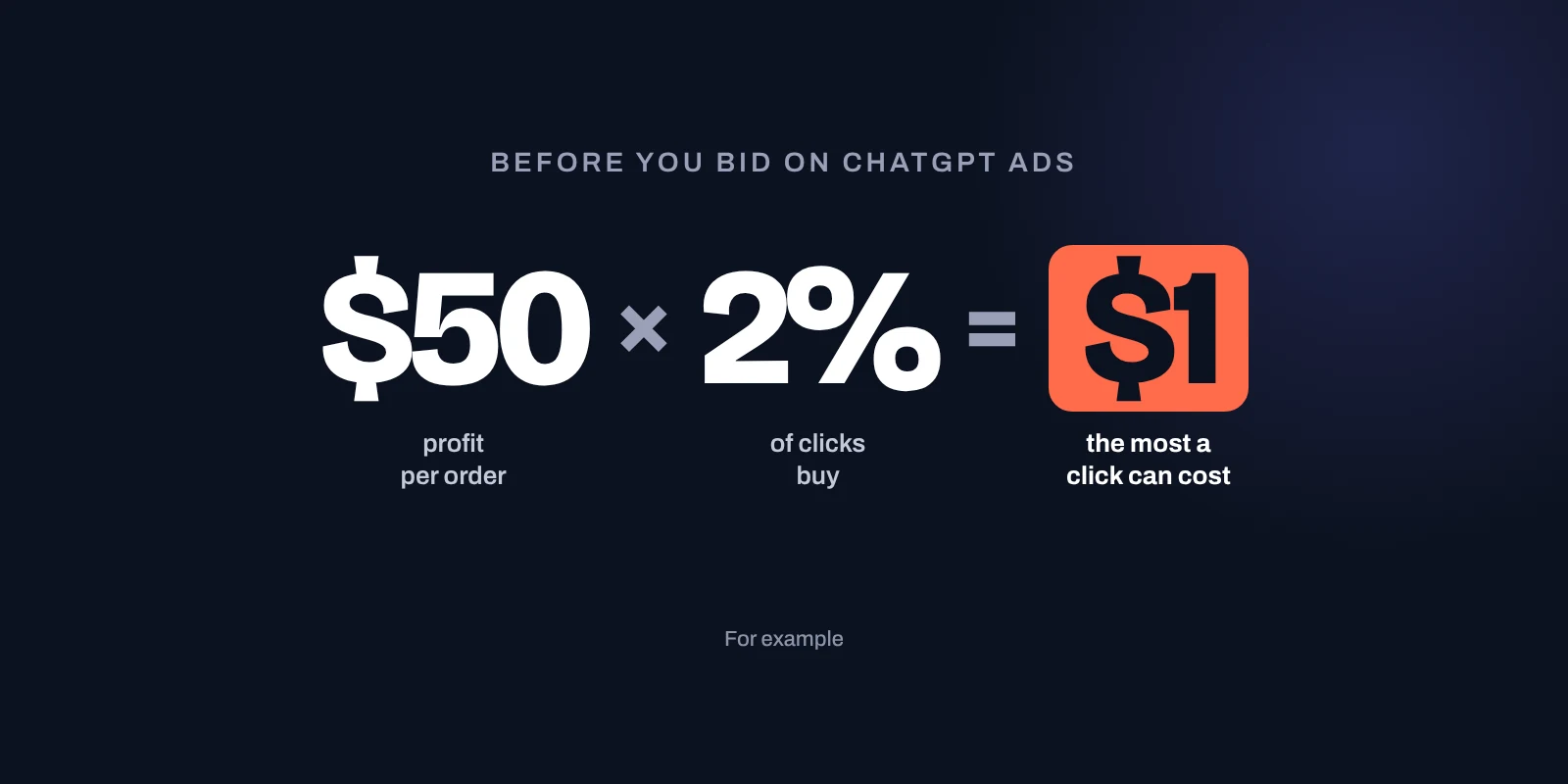
Multiply it by your ad conversion rate, the share of ad clicks that end in an order. That’s the most a click can cost you. Pay more and each order costs more than it earns.
Before your first campaign you don’t know your ad conversion rate, so start from your store’s. Read it in Analytics, from 24 September 2026 on. Shopify changed how it counts sessions from 21 to 23 September, and our guide to Shopify conversion rate shows where to find it.
Then guess lower. Your store’s rate includes returning customers and people who searched for your brand, and a shopper from a ChatGPT ad may never have heard of you. Find your profit per order in the table and pick a column below your store’s rate.
The most a click can cost you, at each ad conversion rate
| Profit per order | 1% | 2% | 3% |
|---|---|---|---|
| $25 | $0.25 | $0.50 | $0.75 |
| $50 | $0.50 | $1.00 | $1.50 |
| $100 | $1.00 | $2.00 | $3.00 |
| $150 | $1.50 | $3.00 | $4.50 |
The table is in whatever currency your store uses. OpenAI’s suggested bid is in US dollars, so convert before you compare. Read as US dollars, most cells sit below that suggestion. Only three reach it, all at a profit per order of $100 or more. If your cell is lower, bid what it says, even if your ad shows less often. Each click then stays within what an order can pay for, if your ad conversion rate is at least your column’s.
You know the most a click can cost you: run a capped test
Your cell is the maximum bid for your first test. Bid per click: the table works per click, and with a views bid you pay whether or not anyone clicks. Write down a spending cap first: it limits what the test can lose.
Your bid wins too few clicks: fix the page first, or pay per sale
Your test may win few clicks, or Ads Manager may warn that your bid could limit how often your ad is shown. Don’t raise the bid past the most a click can cost you. That only buys clicks that lose money. Fix the product page first, using the next section: as your ad conversion rate rises, so does the most a click can cost you. Or, if you can, pay per sale on Shop Campaigns.
Your product page has to finish what the ChatGPT conversation started
Your ad conversion rate is won or lost on the product page the ad opens. A shopper who clicks a ChatGPT ad has been talking through what they want, and lands with something specific to check, such as the price, the delivery time or returns. On a phone, the first screen of the page you advertise has to answer it. On one product page we tested, it didn’t: delivery and returns sat below Add to cart, so a shopper checking them had to scroll past the button. Bring a short delivery and returns line up near the price; the last check below shows how.
Some shoppers will have tapped Ask ChatGPT on your ad first, and advertisers have no influence over those answers, OpenAI says. Your page has to agree with answers you didn’t write, and settle the rest.
Check the page you’d advertise against its ad:
- Send a product ad to that product’s page. Land a shopper on your home page or a collection and they have to find it again.
- Link the ad to the colour it pictures. Otherwise the page can open on another colour. The last section shows how.
- When the ad’s colour sells out, pause the ad or swap its image. Otherwise the shopper finds the colour they saw crossed out as sold out.
- Match the price in the ad. A shopper who came to check the price will spot a different one, and ads must be truthful, including about pricing.
- Put a delivery and returns line under the price, so it shows before the button.
The last check needs no code:
- Duplicate your theme. Do it before you edit, because saved changes show to every visitor and the copy lets you go back.
- Open the product template. In the theme editor, click the page drop-down (it starts on Home page) and choose the product template your advertised product uses.
- Add a text block. Click Add block in the section that holds the price and choose a text block (the name varies by theme).
- Write the line. Give your delivery cost, delivery time and returns window in one sentence, so a shopper sees all three beside the price.
- Save and look. Click Save and open the product on your phone. If the line isn’t under the price, move it there.
A CRO audit checks your product pages on a phone, the way a shopper arriving from an ad sees them, and ranks the fixes.
How to tell whether the ads paid: tag the links, count sales in Shopify
Once the test runs, judge ChatGPT ads on the sales Shopify records, not on Ads Manager’s conversions. Different platforms can credit the same purchase differently.
Sessions mislead too. OpenAI’s ad-review crawlers, automated visitors that check landing pages, may visit yours. Other analytics tools may count those visits as paid traffic, though they aren’t billed as clicks.
To find those sales, tag every ad link, so your ad’s shoppers stay apart from everyone else ChatGPT sends you. UTM tags are labels added to the end of a link. They carry through when a shopper clicks your ad, so analytics tools can read them, including Shopify’s reports. The builder below adds them to your page’s address for you:
UTM link builder
Your ad’s link
- Open the product page. Go to the product the ad is for, in a browser.
- Pick the colour the ad shows. Click it, so the page matches the ad.
- Copy the address. Take it from the address bar.
- Check it in a private window. Paste the address in. The page should open on the ad’s colour. If it opens on another, change the ad’s image to match, so the shopper lands on what they tapped.
- Add your UTM tags. Paste the address into the link builder above and copy the tagged link. Spell each value the same way every time, because Shopify’s UTM campaign field needs consistent naming.
- Paste it into the ad. Use it as the ad’s landing page in Ads Manager, so every click carries the tags.
When the test ends, read the result:
- Wait a day after the test ends. Spend figures can lag by 7–8 hours. Read too soon and each order looks cheaper than it was.
- Take spend from Ads Manager. It’s what you’re billed for, so note the test’s total there.
- Take sales from Shopify. Go to Analytics > Reports and open Sales attributed to marketing, which Shopify builds from UTM-tagged links and Shopify Marketing campaigns. Set the date range to your test and find your campaign name.
- Estimate orders. Divide those sales by your average order value. It’s an estimate, because orders vary in size.
- Work out cost per order. Divide spend by estimated orders. Below your profit per order, the test made money. Above it, fix the product page or stop.
Checklist
- Your category checked against OpenAI’s ad policies, and your route: Ads Manager, OpenAI’s app for Shopify (US stores) or Shop Campaigns
- Your profit per order, and the most a click can cost you from the table
- A click campaign with a maximum bid no higher than that, and a written spending cap
- The ad linked to the product page and colour it pictures, at the price the page shows
- A delivery and returns line under the price
- UTM tags on every ad link, and cost per order from Ads Manager spend and Shopify sales
On a coaching call we work out your profit per order, the most a click can cost you and how you’ll read the test.

A collective of ecommerce veterans with 15+ years across marketing, development and UX. We audit stores, coach teams and build tools for Shopify merchants.